
The Power BI developer's survival guide to Microsoft Fabric
Power BI Premium is gone. Microsoft Fabric took its place. Here's what actually changed for you, what didn't, and where to start - without the panic.

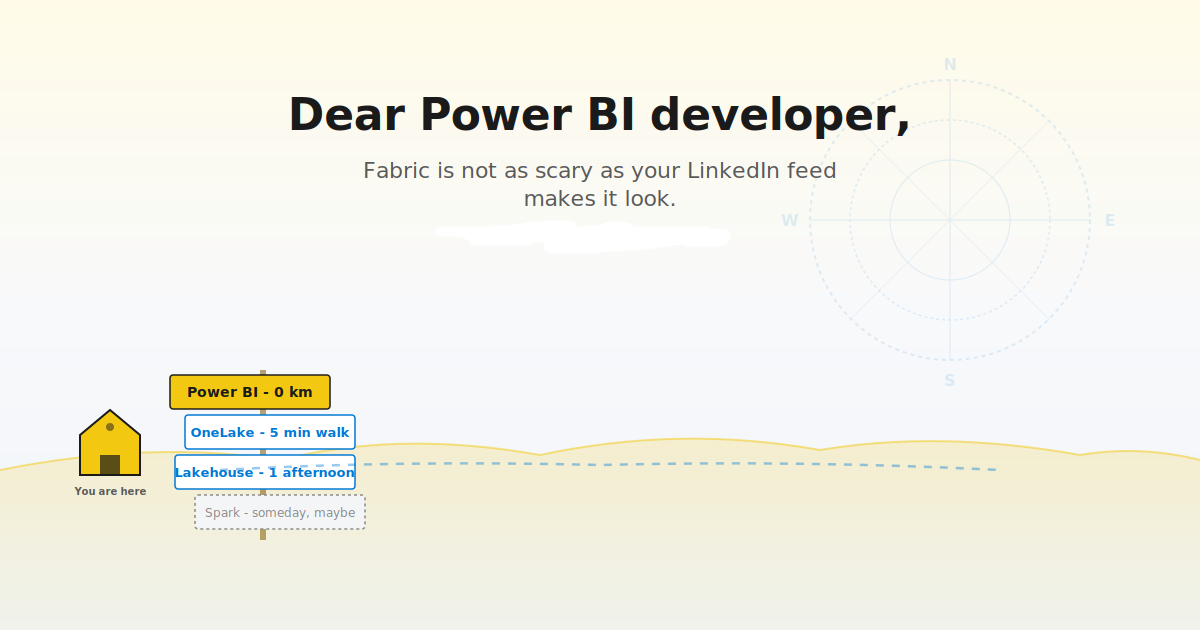
If your social media feed has been making you feel like you missed the bus on Microsoft Fabric - take a breath. You didn’t miss anything. You’ve been riding the bus the whole time. It just got a new name and a few extra stops.
I’ve been talking to a lot of Power BI developers in the last 12 months who are truly anxious about Fabric. Truth to be said, the messaging from Microsoft has been hype-heavy, and the community has been moving fast. And every time you open LinkedIn or Reddit, somebody is announcing a new Fabric feature you’ve never heard of, with a screenshot of a Lakehouse you don’t understand, talking about MLVs and Direct Lake on OneLake and Fabric IQ as if everyone already knows what those things are.
I get it. It feels like the ground is shifting under your feet.
So, the first thing I’m telling everyone (and all of you who have ever attended my trainings/live sessions already heard this from me): your Power BI skills are intact. Your reports still work. Your DAX matters more than ever. And you do not need to learn Spark this weekend.
What you DO need is a map. One that tells you what actually changed for YOU as a Power BI developer, what you can safely ignore for now, and where to start when you’re ready to take the next step. This article aims to be that map. By the way, I already wrote about Power BI in the era of Microsoft Fabric here.
What didn’t change (start here and breathe)
Before we talk about anything new, let me confirm what’s still exactly the same. Because in all the noise about Fabric, this part rarely gets said.
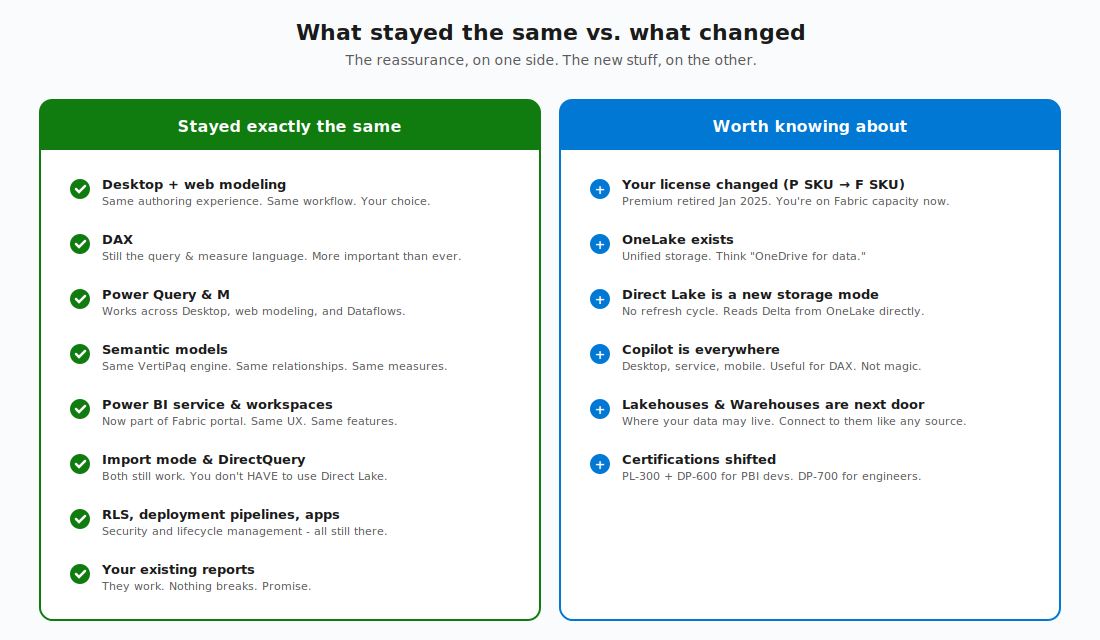
Power BI’s authoring experience is still the same. Whether you build models and reports in Power BI Desktop or in the browser using web modeling (which is now essentially at parity with Desktop), the workflow you know hasn’t changed. You still load data, build a model, write DAX, design a report, and publish. Same skills, same patterns.
DAX is still “the language” for semantic models, and it’s not going anywhere. If anything, it’s MORE important now - Copilot generates DAX, Direct Lake queries run on DAX, and every new AI feature in Fabric depends on well-written measures. The better your DAX, the better everything downstream works.
Power Query and the M language still handle data transformation across Desktop, web modeling, and Dataflows. And, although the old Dataflows Gen1 will be officially deprecated, the Gen2 version is here to stay, and it relies on Power Query/M skills. Your existing knowledge of Power Query patterns - merging, appending, conditional columns, parameters - all still applies.
Semantic models are still the same thing. Same VertiPaq columnar storage, same relationships, same calculated columns, same measures, same Best Practice Analyzer rules…
The Power BI service is now part of the Fabric portal, but if you log in tomorrow morning, you’ll find the same workspaces, the same reports, the same scheduled refreshes, the same Apps experience. Even the URL didn’t change.
Import mode and DirectQuery still work exactly as they did before. You don’t HAVE to use Direct Lake. If your reports run fine on Import mode with a daily refresh, that’s a perfectly valid architecture in 2026.
Row-level security, deployment pipelines, gateways, Apps - all still there. Nothing was removed.
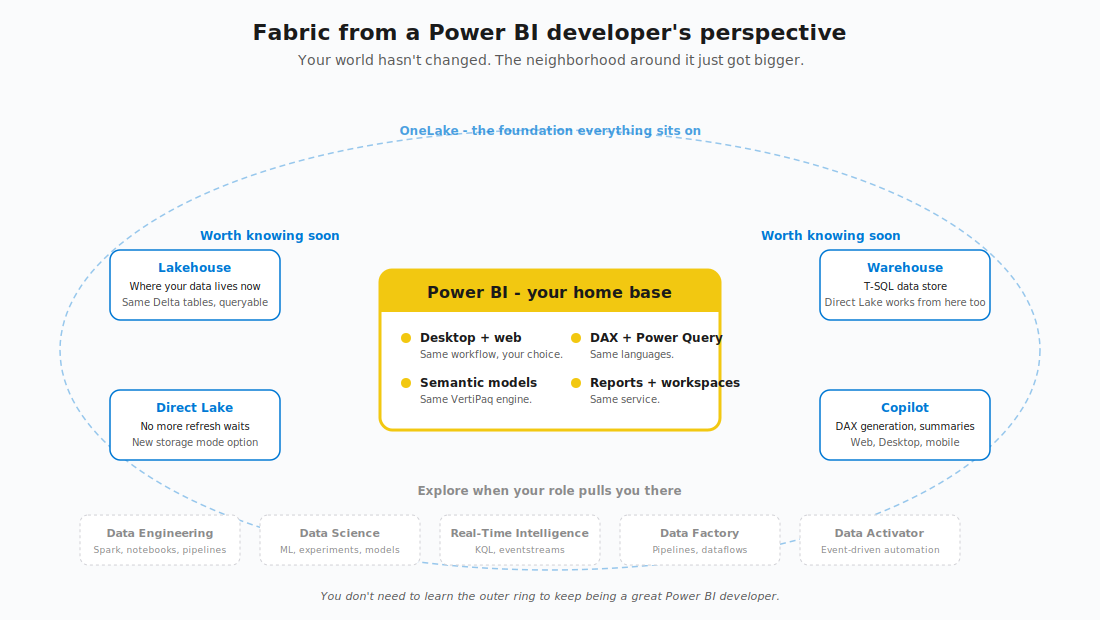
OK, so your foundation is solid. But some things DID change, and a few of them actually matter to you. Let me walk you through the ones that are worth your time.
What changed and actually matters to you
I’ve identified five things. If you understand these five changes, you understand 90% of what’s different about being a Power BI developer in Fabric.
1. Your license changed (and it’s fine)
In January 2025, Microsoft retired the Power BI Premium P SKUs. If your organization was running on Premium - P1, P2, P3 - your environment has already been moved to Fabric capacity (F SKUs). P1 is roughly equivalent to F64. P2 is roughly F128, and so on.
The key thing to remember is that nothing broke during that transition. Reports work, semantic models work, paginated reports work, scheduled refreshes work… Your existing investment is preserved.
What you GAINED was access to the full Fabric platform under the same license - Lakehouses, Warehouses, pipelines, Real-Time Intelligence, all of it. You don’t have to use them, but they’re sitting there, included, ready when you want them.
One thing to keep in mind: below F64, report consumers still need Power BI Pro licenses to view content. At F64 and above, viewer access is included in the capacity license, which is why F64 is the commercial threshold most organizations target if they have more than 300 report consumers.
2. OneLake exists, and your data lives there now
OneLake is the unified storage layer for everything in Fabric. Think of it as “OneDrive for data.” One lake. One location. One copy.
When you create a Lakehouse, a Warehouse in Fabric, the data is stored in OneLake as Delta format - the open table format that’s become the industry standard for analytics. Your semantic models, Lakehouse tables, Warehouse tables, they all live in the same place underneath.
Why does this matter to you as a Power BI developer? Because of the next change…
3. Direct Lake is a new storage mode option
You already know two storage modes: Import (load data into the model, refresh on a schedule) and DirectQuery (query the source live every time). Each has trade-offs you’ve probably learned the hard way: Import is fast but stale, DirectQuery is fresh but slow.
Direct Lake is a third option. It reads Delta tables directly from OneLake into memory - no scheduled refresh, no live query overhead. Fast queries AND fresh data. Direct Lake is the closest thing to “you can have both” that Power BI has ever offered.
The key thing to bear in mind is that the experience of building reports doesn’t change. You still author DAX the same way, you still design visuals the same way. The mechanics underneath changed (your model is reading directly from Delta in OneLake instead of holding its own copy), but as a developer, the workflow looks the same.
When should you care about Direct Lake? If your semantic models are large (millions of rows, multi-GB models) and refresh times are painful, Direct Lake is worth investigating. If your models are small and refresh takes 30 seconds, Import mode is still perfectly fine. No urgency.
I wrote about the two flavors of Direct Lake - Direct Lake on SQL and Direct Lake on OneLake, so you may want to read that one as well.
4. Copilot is everywhere
Copilot in Power BI has expanded significantly in the last year. You’ll find it in Desktop (generates report pages, generates DAX, suggests measures, explains formulas), in the service (report-level chat, creates visuals from natural language), and on mobile (as of April 2026, conversational report exploration on your phone or tablet).
I built an entire Pluralsight course on Copilot in Power BI, so here’s my honest take: it’s useful, not magical. Copilot is really good at generating starter DAX measures, summarising what’s on a report page, and helping you ask exploratory questions of a model. It’s NOT that good at writing complex measures from scratch, understanding nuanced business logic, or working with poorly-designed semantic models.
The pattern I’ve seen is consistent: the better your semantic model, the better Copilot performs. Good table names, good column names, properly defined measures, clear relationships… If those are in place, Copilot becomes a real productivity tool. If they’re not, Copilot generates plausible-looking nonsense.
If there’s interest, I’ll write a full, honest field report on Copilot in a future post. Let me know in the comments.
What you can safely ignore (yes, I really mean it)
Now, the section that nobody else will write for you:) The Fabric ecosystem is enormous: Spark, KQL, Real-Time Intelligence, Data Factory, Data Activator, MLVs, Fabric IQ, Data Agents… And the social media-driven pressure to learn ALL of it RIGHT NOW is misplaced.
You can safely ignore most of it. I’ll try to share the breakdown:
Spark notebooks and PySpark. Unless your role is expanding into data engineering, you don’t need these. Your Power Query skills are still the right tool for Power BI data prep. If a data engineer on your team builds a Spark notebook that lands clean Delta tables in OneLake - great. You consume them. You don’t need to write them.
KQL databases and Real-Time Intelligence. Only relevant if you’re working with streaming data, IoT telemetry, or high-volume event logs. Most PBI developers aren’t. If your data lives in a database and refreshes daily, Real-Time Intelligence is not your problem.
Data Activator. Event-driven automation. Honestly, it’s very interesting, but not core to report development. File this under “explore when curiosity pulls you there.”
Fabric IQ and Data Agents. The new AI/natural language layer that lets users ask questions of their data in plain English. Worth keeping an eye on, but you don’t need to architect around it yet.
Materialized Lake Views (MLVs). Brilliant for data engineers building medallion architectures. Not something Power BI developers need to create, though you’ll happily consume the silver and gold MLVs that data engineers build for you. If you’re curious, my MLV deep dive explains them in detail. But you don’t need to read it to keep doing your job well.
The key message: learn these when your role demands it or when your curiosity genuinely pulls you toward them. Not because the algorithm told you to be scared.
The “start here” path
OK, you’re ready to take the first concrete step. Here’s the sequence I’d recommend - the one I give to Power BI developers on my team when they ask where to begin.
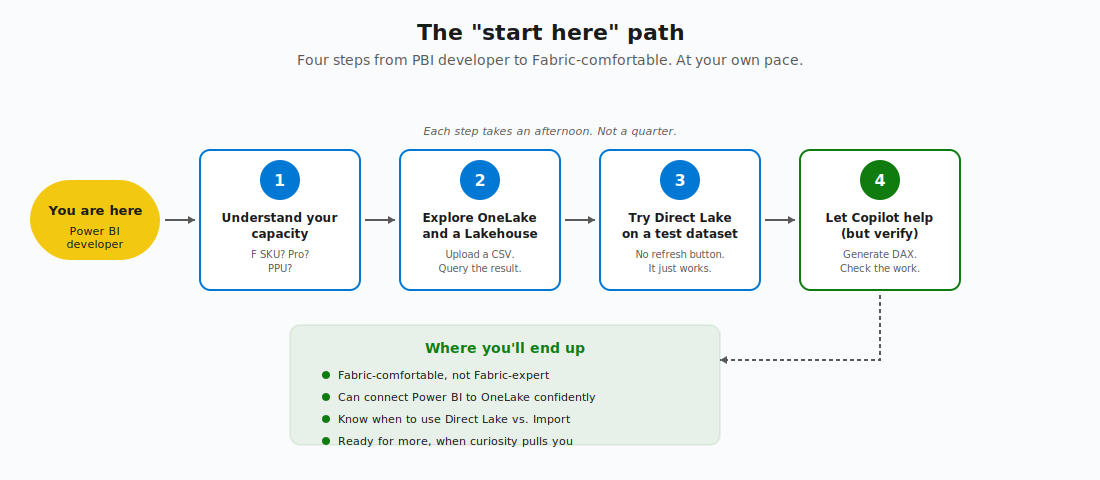
Step 1: Understand your capacity. Find out whether your organization is on Fabric capacity (an F SKU), Power BI Pro, or Premium Per User. This single fact determines what’s available to you.
Step 2: Explore OneLake and a Lakehouse. Create a Lakehouse in a workspace. Upload a CSV file. Watch it become a Delta table. Query it from the SQL analytics endpoint. Connect Power BI to it - from Desktop or directly in the browser, your choice. This single hands-on exercise demystifies 80% of the Fabric terminology you’ve been seeing. The best thing? It takes an afternoon.
Step 3: Try Direct Lake on a non-production dataset. Create a semantic model from your Lakehouse using Direct Lake storage mode. Build a small report. Notice that there’s no refresh button - you just publish, and the data is always current. Compare query performance to your existing Import model. Get a feel for how Direct Lake behaves.
Step 4: Let Copilot help you with something real, but verify. Open Copilot - it’s available wherever you author Power BI content. Ask it to generate a DAX measure for something specific to your model. Check its work. Iterate. Then ask Copilot to summarise a report page and see if the summary is accurate. Build your own sense of where Copilot is trustworthy and where it isn’t.
Each step takes an afternoon. Not a month or quarter.
The career question nobody wants to ask
And, to wrap this up, let me address the elephant in the room: “Is my Power BI career safe?”
Short answer: yes. But the long answer is more interesting and more nuanced. I already wrote an article about the future of Power BI from the rapid rise of AI-generated dashboards. Here, I want to focus on the Power BI future, looking through the Fabric lenses.
Power BI developers are NOT being replaced by Fabric developers. The roles are different. Power BI development - semantic modeling, DAX, report design, business-facing analytics, is a distinct and valuable skillset that the platform fundamentally depends on.
What IS changing is that the best Power BI developers in 2026 will be the ones who understand where their data comes from (OneLake, Lakehouses, Warehouses) and how it gets there. You don’t need to BUILD the pipeline. But understanding the architecture around your reports makes you significantly more effective and significantly more valuable in conversations with data engineers, architects, and stakeholders.
If you are looking for certifications as a method to prove your skills, there are a few certifications to keep on your radar. The PL-300 (Power BI Data Analyst) is still the core PBI certification and is being kept current - it’s still the foundation. The natural next step for Power BI developers moving into Fabric is the DP-600 (Fabric Analytics Engineer Associate). DP-600 bridges semantic modeling, DAX, and the broader Fabric platform from a BI perspective. If colleagues on your team are heading into data engineering, DP-700 (Fabric Data Engineer Associate) is their path - different role, different exam. For Power BI developers, PL-300 followed by DP-600 is the combination I’d recommend.
Another point that is worth saying out loud: your DAX and modeling skills are MORE valuable in Fabric, not less. Direct Lake performance depends on well-designed Delta tables and clean semantic models. Copilot performs better with clean models. Data Agents generate better answers from clean models. Fabric IQ surfaces better insights from clean models. EVERYTHING downstream depends on the quality of the semantic layer, and the semantic layer is YOUR domain.
The best career move you can make right now isn’t learning Spark. It’s getting even better at semantic modeling and DAX. Master Power BI’s modeling fundamentals, get fluent in advanced DAX patterns, learn how to design models for Direct Lake performance, and then, when you’re ready, add Fabric context around it.
Wrapping up
Fabric isn’t a replacement for Power BI. It’s the platform Power BI now lives inside. Your skills are intact. Your reports work. Your DAX matters more than ever. And you don’t need to learn the entire Fabric stack to be excellent at your job.
Start with the four steps. Take them at your own pace, ignore the parts that don’t apply to your role yet, and if you want to go deeper, I’ve been writing about Fabric architecture, Direct Lake, materialized lake views, and the Warehouse vs. Lakehouse decision - all from a working architect’s perspective.
You haven’t missed the bus. You’re on it. The destination is just a little further than you thought.
Thanks for reading!
Thanks to Claude for creating these nice-looking illustrations.